
Overview
Suprema G-SDK is a way of communicating with BioStar devices. It consists of the device gateway and the client libraries and the device gateway handles the communication with the devices.
The Device Gateway is suitable for systems with up to 1,000 devices. However, if you are using more than 1,000 devices, you must use the Master Gateway.
Device Gateway: Deployed on-site to communicate directly with devices and execute device control operations.
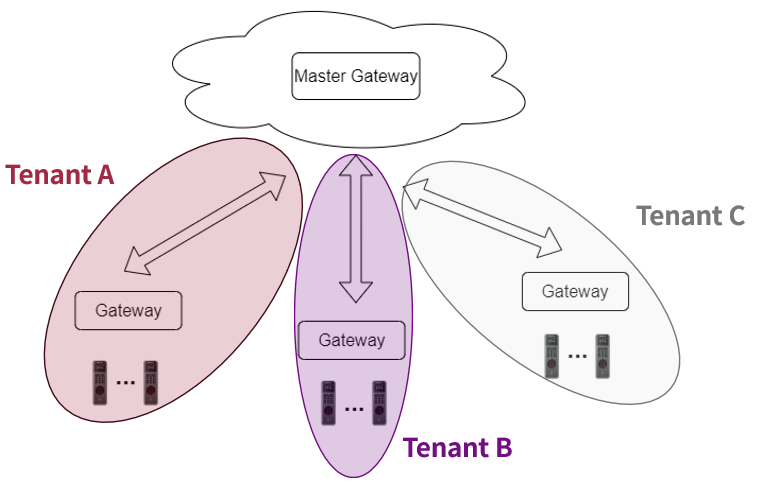
Master Gateway: An enterprise component that centrally manages multiple Device Gateways, enabling large-scale, and multi-tenant operations.
This article explains the differences between the Device Gateway and the Master Gateway.
** For the concluding part of your article, you can use one of the following versions depending on the tone you prefer:
[G-SDK Manual]
- https://supremainc.github.io/g-sdk/python/quickMaster/
- https://supremainc.github.io/g-sdk/master/install/
[Article]
1) Core Concepts and Roles
Device Gateway
A gateway layer that connects directly to Suprema devices over TCP/UDP.
Client applications connect to the Device Gateway via gRPC to perform device operations such as:
User/card/fingerprint/face enrollment
Event retrieval and monitoring
Firmware upgrade and configuration changes
A single Device Gateway typically supports up to ~1,000 devices, making it suitable for a single site or small-to-mid deployments.
Master Gateway
Acts as a central hub that manages multiple Device Gateways.
Supports multi-tenant environments by logically separating and managing.
Enables expansion to ~100,000 devices (via multiple Device Gateways), designed for enterprise-scale deployments.
2) Architectural Differences
Device Gateway Architecture
Device Gateway is internally composed of two server components:
Device Server
Handles connectivity with devices (Default ports: 51212 (non-SSL) / 51213 (SSL))
gRPC Server
Handles gRPC communication with client applications (Default port: 4000)
Note!
If you run multiple gateways on a single server, a UDP port conflict will occur.
The UDP port of the gateway is fixed internally and cannot be changed.
Master Gateway Architecture
Client applications authenticate with the Master Gateway first, then control Device Gateways/devices through it.
gRPC Server (Default port: 4010)
3) Functional and API Perspective
Device Gateway Focus (Device Control)
Primary functions include:
Device discovery, registration, and connection management
Enrollment/update/delete for user access data:
Cards, fingerprints, faces, and related credentials
Event/log retrieval, real-time monitoring, and alarm handling
Firmware upgrades and device configuration changes
→ Overall, Device Gateway is optimized for device-level operations and execution.
Master Gateway Focus (Centralized Operations)
Exposes most device control APIs available in Device Gateway, but from a centralized top layer.
Adds enterprise management capabilities, including:
Tenant creation and management
Tenant-level assignment of Device Gateways and devices
Large-scale inventory management and querying
Authentication and authorization models for admins vs tenant accounts
4) Security and Authentication Comparison
Device Gateway Security Model
Client↔Gateway communication uses SSL-based gRPC, secured via server certificate/key settings.
Device↔Gateway security depends on device-supported encryption options and gateway configuration.
Well-suited for smaller, single-organization deployments with simpler authentication needs.
Master Gateway Security Model
Designed for stronger enterprise security requirements, typically combining:
X.509 certificate-based identity
Token-based authentication (e.g., JWT)
Supports multi-tenant security requirements such as:
Tenant-specific certificate/key management
Separation of admin vs operator/tenant roles
Better isolation and governance for shared platforms
5) Scalability and Deployment Scenarios
When to Use Device Gateway Only
Recommended for:
A single building/campus or a limited physical site
~1,000 devices or fewer
A single-site environment
When to Use Master Gateway + Multiple Device Gateways
Recommended for:
Large enterprises with thousands to tens of thousands of devices distributed across many sites/countries
Cloud / managed service models that host multiple customers (multi-tenant) on one platform
Environments requiring centralized governance: security, auditing, standardized policies, and unified inventory management
7) Summary Comparison Table
| Category | Device Gateway | Master Gateway |
|---|---|---|
| Primary role | Direct communication/control for devices | Centralized management of multiple Device Gateways |
| Device scale | Up to ~1,000 devices per gateway | Up to ~100,000 devices via many Device Gateways |
| Target environment | Single site, small-to-mid projects | Multi-site, multi-tenant enterprise deployments |
| Security/auth | SSL-based gRPC, simpler auth model | Stronger auth (cert + token), tenant isolation |
| Multi-tenancy | Typically single organization | Tenant-based separation and management |
| Operational complexity | Lower (simpler setup/ops) | Higher (tenant/cert/gateway governance required) |
8) Q&A
Q1. When is Master Gateway effectively required?
A. When you need multi-site operations, multi-tenant hosting, centralized inventory visibility, and unified security/audit governance across many gateways and devices.
Q2. Is Device Gateway alone sufficient for device control?
A. Yes. For single-site, single-tenant deployments, Device Gateway typically provides all necessary device control functions.
Q3. Can multiple Device Gateways run on one physical server?
A. While it is possible to run multiple Device Gateways on a single server, port conflicts may occur. Therefore, we highly recommend running only one Device Gateway per server.